Sponsor guide
ConferenceOS can publish sponsor tiers, prospectus information, sponsor profiles, virtual booths, offers, and event-specific sponsor portals. The organizer owns every sponsor assignment and decides which capabilities are enabled.
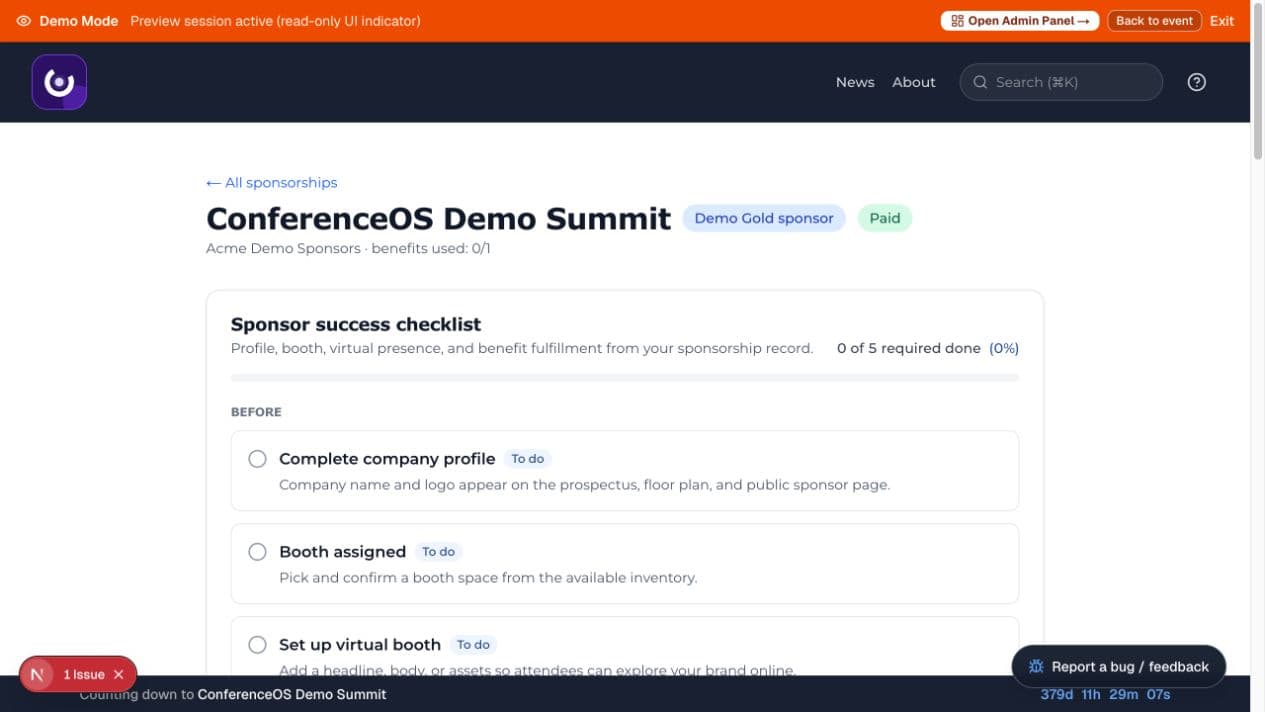
Figure 1 — The sponsor portal summarizes the event, sponsorship level, payment state, benefit usage, and a readiness checklist.
Public sponsor information
Open /events/<event-slug>/sponsors to see sponsor information published for the event. A detail page is scoped to that event; a relationship or portal from one event must not reveal another event's private sponsor work.
The event may publish a prospectus at /events/<event-slug>/sponsors/prospectus. Public pages are marketing surfaces, not proof of contract terms, payment, or benefit fulfillment.
Sponsor access
Sponsor workspace access is not granted by knowing a URL. It depends on an event-specific sponsor association and, in a live installation, the account or invitation the organizer configured. Use the exact portal link supplied by the organizer and confirm the event and organization at the top of the page.
The portal can include:
- a sponsor success checklist;
- level, payment state, and benefit usage;
- company profile and public virtual booth content;
- offers and booth assets;
- physical booth selection when inventory is published;
- complimentary-pass claim links and remaining allotment;
- captured leads and consented attendee-list access when enabled.
Availability varies by sponsorship level and event configuration.
Complete the sponsor checklist
- Confirm the company name, event, level, payment state, and primary contact.
- Add or verify the public company profile, logo, links, and description.
- Complete physical and virtual booth information before the organizer's deadline.
- Review each included benefit and track it as the event instructs.
- Generate pass claim links only for authorized recipients, and share each single-use link privately.
- Confirm final public assets with the organizer before promotion.
A visible edit control does not guarantee write permission. In Demo Mode, server guards reject sponsor mutations even when the full interface is shown.
Booths, offers, and assets
Use approved image, video, PDF, and URL assets. Check that links use HTTPS, that you own or have permission to publish the content, and that the public booth does not expose contracts, internal notes, credentials, or attendee data.
Physical booth inventory may not be available until the organizer publishes it. A temporary hold is not a final assignment; follow the confirmation shown by the portal.
Leads and attendee consent
Sponsor access is not blanket permission to access or market to attendees. Only attendees who explicitly consented to sponsor data sharing may appear in a consented list. Withdrawn consent must be honored immediately, and downloads are audit-relevant.
Use captured leads only for the purpose communicated at capture. Keep entered CRM values separate from enrichment, follow the event's retention rules, and do not upload attendee exports to unapproved AI or advertising systems.
Get help
Contact the organizer for missing benefits, an incorrect level or payment state, booth inventory, pass allocation, or portal access. Do not request sitewide organizer access or attempt to reuse another sponsor's URL.